Find us on Google+

Friday, November 27, 2009

Motion Background Overload

Easyworship is a popular piece of software for projecting the words of songs and sermon presentations. A lot of churches use it, and a lot of churches over use it. It has the ability to project moving backgrounds behind the text. This is one of those cool ideas that tends to be over used and distracting.

We were attending a church and one Sunday they had a different moving background behind just about every slide. I asked the computer guy after the service if they had gotten a new background pack. He said that they had. And they used every single one that Sunday.

Don't do this. Please. If you absolutely need to use a moving background, then only use one. I'm not a fan of using any moving background myself. But that's just my opinion.

The important principle here is to make sure that whatever you project will get your point across and not distract from it.

Thursday, November 26, 2009

Happy Thanksgiving

Happy Thanksgiving! In spite of some problems that I see with a whole hearted acceptance of everything that is involved in Thanksgiving, I still think celebrating it is a great idea.

By the way, Ben Franklin wanted the turkey to be our national bird. He thought that the bald eagle was a disgusting, stupid bird.

Wednesday, November 25, 2009

Thanksgiving

We talked about the place of Halloween in church, and it's my opinion that holidays should be recognized and celebrated in the church. Sometimes I think we approach Thanksgiving with the opposite perspective from Halloween. With Halloween the church often rejects the holiday completely. With Thanksgiving the church often wholly accepts the holiday.

What is some of the things that we celebrate on the third Thursday in November aren't in line with the teachings of Jesus? This wouldn't be a popular message to preach would it? Descrying the evils of gluttony might be offensive to people's tradition of gorging until they pass into a turkey coma. How would it go over if you spoke about being Christians first and US citizens second? Thanksgiving is a national holiday celebrating the history of our nation after the pilgrims. But that history is filled with mistakes and evils as well as things for which we should be thankful.

How do you deal with unpopular topics?

Tuesday, November 24, 2009

DVD Knife

Lifehacker delivers a review of a little piece of software that could be incredibly useful for adding movie clips to your sermon. It's called DVD Knife and it allows you to stick in a DVD and pull out exactly the scene that you need.

If you've ever tried to work with inserting DVD clips into your sermon, you will know that this could be a huge time saver.

Monday, November 23, 2009

7 Pathways to God


John Ortberg's "God is Closer Than You Think, has a section in which he describes the 7 spiritual pathways in Christian history.

1. Intellectual Pathway - "... draw closer to God as they learn more about Him."
2. Relational Pathway - "... have a deep sense of God's presence when they're involved in significant relationships."
3. Serving Pathway - "... God's presence seems most tangible when they're involved in helping others."
4. Worship Pathway - "... have a natural gift for expression and celebration."
5. Activist Pathway - "You have a passion to act."
6. Contemplative Pathway - "God is most present to you when distractions and noises are removed."
7. Creation Pathway - "... have a passionate ability to connect with God when they are experiencing the world He made."


These pathways describe different preferences and connection points for us. None is better than any other one, but too often we emphasize just a couple to the exclusion of others. The intellectual and worshipful pathways are given prime position on Sunday morning, but the activist who cries out for social change is often ignored. We need to allow our people to explore all the different pathways. Have a time of quiet contemplation right there in church on Sunday morning. Spend time looking at art and discussing it. Go outside and experience creation first hand.

How can you help people explore the 7 spiritual pathways?

Friday, November 20, 2009

Reader Survey

I'm curious about who is reading this blog. Would you let me know what's going on in your life so that I can write a blog that will be more helpful to you?

Where are you working?

How often do you preach?

What (if any) presentation software do you use?

What questions do you have about preaching?

What books are you reading?

What websites do you follow?

What's your favorite song?

If you have some time to let me know what's going on with you I would really appreciate it.

Thursday, November 19, 2009

Facebook

You need to get on Facebook. You are probably already on the most popular social networking site in the history of the internet, but if you aren't you need to change that. Facebook is where people are going to communicate and connect with new and old friends. Sure, that's nice.

But Facebook is where your sermon can gain the power to really connect to people where they are. It's way too easy to prepare a sermon while sitting in an office behind a desk with no connection to people. But sermons are all about people. One way that I found to connect the two is to pose questions on Facebook as they come up in my sermon prep.

Don't try to clean it up or explain the background or exegete the text. Just ask the kind of honest, gut wrenching questions that real people ask.

If God is good then why do bad things happen?

Do I have to be perfect?

Is it ok to kill people?

Why are kosher laws not in effect any more?

Ask these kinds of questions and then stand back. The results are great and the connection with real people is amazing. I found so much fodder for my sermons using this method, that I don't think I'll ever go back.

Wednesday, November 18, 2009

Black Screen

Sometimes the Black Screen of Death can spell doom for your re-booting computer. But if you don't have the flashy cursor and you are giving a PowerPoint presentation, the Black Screen can be your friend.

You don't have to have something on the screen all the time. I will say it again, you don't have to always project something. The power of your images comes when they integrate with your message to amplify the total content. If you leave up a picture after the point has passed you weaken the impact of the point you just made and the point that you will be making.

You can either insert a blank, black backgrounded slide, or if you have the computer within easy reach while you are presenting, you can press the 'B' key to send it to a black screen. Some fancy remotes even have a built in button for this purpose.

Don't neglect the power of not projecting anything.

Tuesday, November 17, 2009

Learning Styles

We are currently in training to become certified English teachers. We're working temp jobs during the week and going to class on the weekend, so I hope I can keep putting out good stuff on this blog.

One thing that struck me is in our class discussion of learning styles. There are a lot of theories and many discussions about learning style, but one thing most people agree on is that people absorb information differently. One theory that I've seen the most is the visual, auditory and tactile learning styles.

If we are only preaching using the spoken word, we are doing a huge disservice to all of the members of the congregation who connect through the visual medium. It's almost like we are refusing to speak their language. It's important to bring the visual element in so that we are honoring the way that God has made people to understand their world.

Then I thought about the tactile (or kinesthetic) learning style. Where does our preaching give people a chance to touch, to taste, to smell, to move? We need to be aware of the fact that there are people in our church that just don't get it from sitting still and being quiet while someone talks to them. They need to be doing things, experiencing things.

Maybe we could bring in some clay for a sermon on the potter and the clay. Or how about hiding bread makers in the room set to start baking at the beginning of the service so that at the sermon on the bread of life, the smell of fresh baked bread is wafting through the crowd. What ways can you think of to engage people in the way they learn?

Monday, November 16, 2009

Windows 7: continuing review

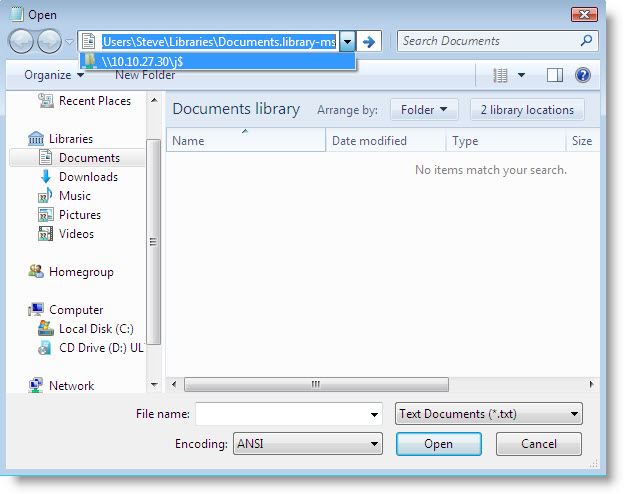
One cool new feature in Windows 7 that I think will be especially helpful for everyone and their Mom is the new file dialogue system. At first blush it looks like what you've used forever, but up in the right corner it has that nifty little "search documents" field. It instantly searches the titles and the content of your documents.

I'll say that again, in case you missed it. It instantly (as in right now, no waiting, or clicking, as you type) searches the titles and the content (if you can't remember what you called it, but you can only remember what you said) of your documents. This is huge. This is amazing. I love it!

If you're like me, you have files all over the place and sometimes it can be difficult to remember where it is. No worries anymore. I know that Mac has had their searchlight going for a while and the search feature from the Windows start menu is just as cool, but having that search feature there when you click "Open Document" is a perfect little touch that makes using Windows 7 a joy.

Friday, November 13, 2009

Collaboration

Collaboration is such a huge value to most people. Having the chance to work together to make a meaningful contribution excites passions and connection. Too bad the sermon is often devoid of collaboration. Very often the sermon is a time where one person is speaking their own thoughts (or reflecting on the thoughts of authors) about the bible. Where is the collaboration?

I will admit that it is very difficult to prepare a sermon collaboratively. It takes a lot of work to get to a place where the sermon can invite other voices. I learned a lot from Ron Clark at the Agape Church of Christ about how to preach so that others are involved. There we would look at a piece of art and discuss it as a church. We would have questions in the middle of the sermon and spend time discussing how the text could apply to our lives.

I know you may be skeptical about how this could work in a large church. I will admit that with 1,000 people the atmosphere is going to be different than with 50, but you can still pose questions. A lot of churches have their greeting time (which is usually pretty lame and boring where visitors feel even more alienated because the members are just firming up lunch plans). What if the greeting time was a time to discuss a work of art shown on the screen? People could walk around and talk with a purpose and it would get them thinking about the sermon.

What could you do to collaborate on the sermon?

Thursday, November 12, 2009

Kuler for color themes

Garr Reynolds over at Presentation Zen kicked out a cool review of a web tool called Kuler which you can use to create a color theme for your presentation. If you have a photo at the core of your presentation, you can extract colors from it to create a palate for the other elements in your slide. As you can see in the picture, it makes for a nice effect.

I can think of a few times when I had to fiddle with the colors of a slideshow and this would have been nice. I think this would be more useful if you are doing a series that has one, central image, or if you have some branded artwork that you want to integrate into your presentations.

Wednesday, November 11, 2009

PowerPoint on Purpose


Over at Biblical Preaching.net Peter Mead has some good things to say about using PowerPoint on Purpose.
For some people, whether or not to use powerpoint is not even a question. It is assumed. I don’t assume I should use it. My default is no powerpoint, then if I use it, I use it on purpose. . . I don’t think it is worth using in order to show your outline (that’s for you, not them), or to show your preaching text (they need the practice reading their own Bibles). I don’t think it’s worth using if it means sacrificing preparation time for formatting time. I certainly don’t think it’s worth using just because you have a projector and a laptop. I don’t think we should use it just because it is used in the business world (please note many in the business world are lousy speakers, and many of the good ones left compulsive powerpoint use behind years ago!) I’d rather have listeners engaged with me and with the Bible in their laps than with a screen.

Haddon Robinson has said that, “A picture is not worth a thousand words (the people who make pictures came out with that!) Some words will never be captured in a picture.”


Yes! I agree. I tend to prefer using PowerPoint more often than not, but all of Peter's points are good and well thought out. Don't just throw something together just because it's expected. Let the content and Scripture drive the visuals, not the other way around. You will dramatically improve the quality of your PowerPoint if you use less quantity and more quality.

Monday, November 09, 2009

TED will rock your world

The TED presentations are phenomenal. If you haven't seen one yet, you are missing out. Below you will see a conductor explaining how the art of conducting applies to leadership. A good conductor can lead without telling everyone what to do at every moment - often the leadership is better when there is less control exerted. A conductor invites the musicians to share their own story and together to make a better story.

Maybe in your presentations you don't need to spell everything out. Maybe your sermon doesn't have to tell people what to think, but rather invite them to explore on their own. Encourage the church to engage the story of Scripture and together you can have a better story.

Sunday, November 08, 2009

Dunbar's Number

Seth Godin is good. He recently blogged about the Dunbar number which is 150. You can maintain 150 relationships. Except I have 500+ friends on Facebook. How do you reconcile that?

Seth argues that you can't really be friends with all those people, not matter how hard you try. I think he's on to something, my Facebook friends aren't super close, and my closest friends aren't really participating on Facebook.

However, I do think that my number of acquaintances has skyrocketed with the advent of Facebook. I never would have reconnected with some high school friends if they weren't online. There is power in that participation.

I think churches need to connect on Facebook. It may not lead to deep and meaningful relationships, but it is an access point for people to get connected. You can set up a church group on Facebook and encourage people to become fans.

What does this have to do with presentations? Well, your presentations are better if you are presenting to friends - if they can connect and interact with you on Facebook, that will give more power to your sermon on Sunday.

How do you connect with people?

Friday, November 06, 2009

Dilbert


The PowerPoint Ninja has shared some Dilbert comics that refer to the software in question. Two things: 1) this is funny stuff with which most people can identify; 2) this is a barrier that you have to overcome with your congregants that have to suffer through this type of work environment. Many times people are bludgeoned by PowerPoint and don't want to experience the same thing at church.

Thursday, November 05, 2009

Simlar Search in Google Images

Google has added a new feature to their image search that allows you to find similar images. So if you see something you like, you can click on the link below the image to find more like that. Very cool. This is a good way to find images that will work well for you.

Wednesday, November 04, 2009

Cool images that communicate

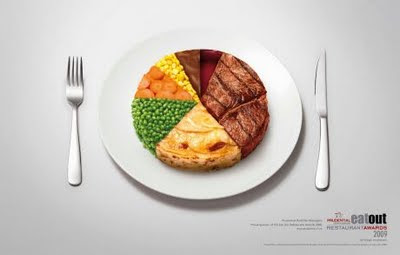
From Slides that Stick comes this image where a pie chart has the data represented with images instead of colors. This is an eye-catching and thought-provoking way to represent the data.

What if in the next budget meeting, there was a pie chart that had pictures of benevolence, missionaries, church buildings, and salaried staff? Would that affect how you budget? Would that help people to realize where their money is going?

How else can we creatively visualize things so as to make a point?

Tuesday, November 03, 2009

Learn from the Pros

Two of the biggest names in presentations are Nancy Duarte and Garr Reynolds and they got together to answer some of the most common questions about presentations. Below is the first of three parts to this video. While what they say is not all directly applicable to the art of preaching, they do have a lot to teach us. I especially like the presentation matrix that Nancy shows. Where do your sermons fall on this matrix? What effect should that have on your work?

Monday, November 02, 2009

Windows 7 - first thoughts

I've been using Windows 7 for about a week now. I plunked down some green for the upgrade from Vista. Overall, I'm happy with the upgrade. 7 does some cool things that make me happier to use my computer. There are a few bugs and quirks that I am figuring out (like hibernation killing my fingerprint reader), but general operation is just as smooth as before, if not more so.

Some people have claimed performance increases over Vista. I haven't seen anything overtly noticeable on my machine in just normal use. I did do an in-place upgrade so I wouldn't have to reinstall all my software. Any OS will be faster after a clean install, so take that with the requisite portion of NaCl.

As for presentation stuff, I think Win7 might just have a few killer apps that will make you happy to get a new laptop with it installed. Pressing the Windows Key and 'P' will trigger an easy to understand selection of the display options (computer only, duplicate the display, extend the display, projector only). No more hunting and dinking and pressing Fn+f8 repeatedly while the audience is waiting for you to get started.

I also love, LOVE, the new taskbar. If the Mac and PC characters from the commercials had a baby. The cute kid would be the Win7 taskbar. It does the dock stuff that has been so cool on OSX, but it adds a Windows productivity twist. Jump-lists. If you right click on a program on the taskbar you will see a list of files recently opened by that program (just PowerPoint or Word, not all your recent documents). And you can pin certain files to the list, so say you are working on a PowerPoint presentation and you get to where you are going to present - just access the jumplist and find your file (or pin it there the night before the presentation to make it even easier). One step gets your presentation open and ready! So cool.

Am I gushing? I might be. I'll have more thoughts as I play with things, but my first impressions are favorable. I would say that if you bought your computer in the last year or so and don't plan to upgrade for a while, the Win7 upgrade might be a good move. If you are looking at getting a new machine in the next year or so, just wait and get Win7 preinstalled.

Friday, October 30, 2009

Flame ON!

On the good ol' interwebs there's a thing called a "flame war". In discussion forums and on blog comments some people think it's fun to start a fight. They pick out some characteristic or something and attack. Relentlessly. It can be a frustrating experience to be on the receiving end of a flame attack. There's no reasoning with a troll (one who starts a flame war). They just enjoy getting a rise out of people and keeping the argument going.

This can happen in church too. Have you ever heard: "Some people have told me they don't like the use of PowerPoint"? The 'some people' tactic is usually just a way to make the critique anonymous. The criticizer is basically a troll. They are inciting an argument, complaining for the sake of complaining.

Sometimes, you just need to disengage. Ignore. You can never win a flame war. Ever. Some people just argue and complain. Sometimes you just need to ignore and move on. You can't keep everyone happy. Don't try.

Thursday, October 29, 2009

Halloween and other hollidays

There are a lot of different opinions about how Christians should interact with holidays. Halloween is one of the most contentious. Should we avoid dealing with evil things? Should we ignore? Should we descry? Should we embrace?

On the one hand, if we completely ignore what is going on in the world we risk becoming irrelevant. But if we completely embrace what the world is doing, we become just as irrelevant.

One thing I like is to interact with the holidays - how has Halloween shaped our culture? How has the church shaped Halloween? Within the conversation is our relevance. Our world is tired of authoritarian commands to think or feel a certain way. They are hungry for a chance to explore and discover for themselves how to think and feel.

Let's provide that opportunity.

Wednesday, October 28, 2009

Windows 7: should you or shouldn't you?


The new version of Windows came out last week. Windows 7 has received some of the best reviews of any Windows product . . . ever. Wired gives it 8 out of 10 filled in circle thingeys.

Microsoft's loyal customers are finally getting the operating system they deserve with Windows 7, and it was well worth the wait.

First, to provide full disclosure (as critics have requested in our previous Windows 7 write-ups) yes, I am indeed a Mac user. But until heading to college, I grew up on a steady diet of Windows. (I made the switch after a system crash that resulted in the loss of an enormous school project.) With that said, Windows 7 thoroughly wowed me, dissolving the grudge I've held against Microsoft for many years.

The latest OS from Microsoft delivers a truly next-generation interface that will transform the way we use our computers, while addressing a number of nagging issues that have turned off Windows users in the past. The Windows team deserves a round of applause.


I'm updating soon. I'll give you my thoughts once I've had some time behind the wheel. However, if the critics are to be believed, this is one upgrade you should make.

Tuesday, October 27, 2009

More Wisdom from Seth

Seth Godin again shares some thoughts that are valuable for church leaders:
"Notice me"

If the new web has a mantra, that's it.

So much time and effort is now put into finding followers, accumulating comments and generating controversy... all so that people will notice you. People say and do things that don't benefit them, just because they're hooked on attention.

Attention is fine, as long as you have a goal that is reached in exchange for all this effort.

Far better than being noticed:

* Trusted
* Engaged with
* Purchased from
* Discussed
* Echoed
* Teaching us
* Leading


Sometimes our churches act like this. We preach, teach, worship, and serve just so people will notice us. What if, instead, churches become leaders in the community? What if churches facilitate discussion in the community?

Flashy, well produced images can get you noticed, but sometimes a simple picture of a family that is being helped can have greater impact.

Monday, October 26, 2009

Performance Affects Perception

I recently saw this article over on Wired and it is just fascinating to me.
In a study of 23 non-football athletes who each kicked 10 field goals, researchers found that players’ performance directly affected their perception of the size of the goal: After a series of missed kicks, athletes perceived the post to be taller and more narrow than before, while successful kicks made the post appear larger-than-life.


The article goes on to explain that after each kick the participants were asked to use a model to represent their view of the goal post.

Interestingly, the change in players’ perception didn’t just depend on how many goals they missed — it also mattered how they missed their goals. Folks who failed because they didn’t kick high enough perceived the crossbar to be taller, while those who kicked to the side viewed it as more narrow.


Things really do look different to us based on how we interact with them.

So what does this have to do with preaching? As we represent visuals we need to be aware that past experience affects the way people will perceive visual input. If you are wanting your church to reach out to the homeless, it will be difficult for them to overcome their past experience (mental disorders, rude, frightening) until they have a new experience. Take video of a homeless person in your town and interview them about their life. Share that with the church to begin to change their perceptions and start to change their actions.

Friday, October 23, 2009

How to Engage Culture

My friend Mark recently blogged about how Christians should engage culture. He brings up some great thoughts:
I've never minded addressing matters about which Scripture is clear, such as dishonesty, greed, sexuality, etc., but I've never felt I had a vantage point from which to comprehensively stand in judgment on all of culture. Quite often, I've known intelligent, sincere Christians who have stood on either side of some issues. If we are going to be divisive, it has to be about matters of good versus evil, which simply cannot be glossed over and replaced with Republican versus Democrat, or vice versa.
The conversation turned to how Jesus addressed culture in his teaching and preaching. I think that Jesus was bold in addressing the cultural issues of his day, but he never aligned himself with any political or religious party. Jesus spoke in parables that would sneak behind peoples' prejudices and open their eyes to a different kind of culture. I think it was Michelangelo who said the best critique is to create something beautiful. Jesus critiqued culture by creating a better, beautiful culture.

How do your sermons create beauty as a critique of culture?

Thursday, October 22, 2009

What is the Gospel?


My friend Mike recently blogged about what constitutes the gospel. I like what he has to say:
What to you is the Gospel and where in scripture does this come from?
How much of the Gospel do you hear each week?
Does your minister/radio host/preacher always come back to Jesus even if he is preaching from Song of Solomon or Numbers?
Do you agree that each message should point back to Jesus every week?

I was really excited the way Ike Graul preached the Gospel this past Sunday as our youth group visited PUMP church of Christ. He pointed back to the sacrifice of Jesus and tied it to the Lord's supper. It was a very good way to wrap the entirety of our service to the Gospel of Jesus.


Good thoughts.

How do you preach the Gospel? How do you use images to represent the Gospel?

I like to use everyday things as examples to show how the gospel can be embodied in our lives. I preached a sermon this summer about obedience and I used a picture of a toilet seat. My point was that married men obey their wives and put the toilet seat down because they love their wives. Our obedience to God is also because we love him. That one image is what everyone remembered from the sermon. Go figure.

Wednesday, October 21, 2009

Cable News is Ruining our World

Seth Godin is a student of culture and often offers insight about things from an entrepreneurial perspective that have great application to church work. Recently he discussed Cable News:
Cable news thinking has nothing to do with fires or with politics. Instead, it amplifies the worst elements of emotional reaction:

1. Focus on the urgent instead of the important.
2. Vivid emotions and the visuals that go with them as a selector for what's important.
3. Emphasis on noise over thoughtful analysis.
4. Unwillingness to reverse course and change one's mind.
5. Xenophobic and jingoistic reactions (fear of outsiders).
6. Defense of the status quo encouraged by an audience self-selected to be uniform.
7. Things become important merely because others have decided they are important.
8. Top down messaging encourages an echo chamber (agree with this edict or change the channel).
9. Ill-informed about history and this particular issue.
10. Confusing opinion with the truth.
11. Revising facts to fit a point of view.
12. Unwillingness to review past mistakes in light of history and use those to do better next time.

If I wanted to hobble an organization or even a country, I'd wish these twelve traits on them. I wonder if this sounds like the last board meeting you went to...


Worse, does this sound like a recent sermon? Friends, our job is not to persuade people to think like we think, or to entice people to fill the seats on Sunday morning. Our job is to speak as one who is speaking the very words of God (1 Pet. 4:11-12).

Tuesday, October 20, 2009

Be an Artist who is a Christian, not a Christian Artist


Over at Media Salt they discussed Christian Media a while ago.

When you hear a piece of media described as “Christian,” what’s the first thing that comes to your mind? For me, if I’m honest, it’s that it is probably a piece of crap. It’s watered down music that is a poor imitation of pop culture, with different lyrics. It’s a poorly written novel that’s “more acceptable” to read because it’s been sanitized of harsh language/circumstances and deals exclusively with faith. It’s a straight-to-video movie with a cheesy plot and even worse acting. Most of all, I think it couldn’t be further from what God expects us to do with all of our creativity.


Yup. I agree.

But it hasn't always been so. Once, Christian artists were at the forefront of the artistic world: Da Vincci, Michelangelo, Handel, etc.

I say we let people be artists and encourage them to express their faith (and doubt and fear and shame and anger) through their art. It doesn't need to be all sanitized, happy, touch-feely crap.

For preachers: learn to be a good public speaker. Trust me, your preaching skills don't necessarily translate. Join Toastmasters and see what it's like to get your point across in 3 to 5 minutes. I dare you.

Monday, October 19, 2009

G.I. Joe!

Sometimes the picture says it all. What images can you use that need no words to explain? How can your sermons become more powerful without you speaking? Weird thought, I know, but sometimes it is better to let people work through things on their own and to let the pictures stimulate the thoughts.

Friday, October 16, 2009

Ignite

So Ignite is a series of presentations that can be no longer than 5 minutes and use 20 slides that advance every 15 seconds. It is a geek culture phenomenon that has reinvigorated presentations.

What we can learn from this is that brevity is highly valued in the geek/youth culture. Get to the point. Images are powerful vessels of meaning. Use them well. Timing is everything, as in comedy, so it is in presentations. Practice.

Check out one of the presentations below.


Thursday, October 15, 2009

PowerPoint tips and tricks #5

Jan Schultink over at Slides that Stick highlights how to stretch an image to fill a slide. There is nothing worse than have your image skewed or having awkward spaces around the sides.

Here is how to do it:

1. Right-click the image, select format picture and click "reset picture" to restore the original aspect ratio (between height and width)
2. Re-size by dragging a corner until both the height or the width are at least equal to the full screen
3. Reposition the image and crop the bits of the image that are sticking outside the canvas
4. Select the image, press format and compress pictures to reduce the file size of your presentation


Check out his post for some good example photos and more sticky, slidey goodness.

Wednesday, October 14, 2009

Mustached Americans

Apparently Mustached Americans earn 8.2% more than their non-Mustached counterparts, but they also tend to save less of that money (11% compared to 14%).

About AMI

The American Mustache Institute, the bravest organization in the history of mankind behind only the U.S. Military and the post-Jim Henson Muppets, is the world’s only facial hair advocacy and research organization, with more than 700 global chapters. AMI battles negative stereotypes and discrimination against Mustached Americans. Based in St. Louis due to the presence of the world’s largest mustache – the Gateway Arch – the organization is committed to recapturing the mustache’s glory years of the 1970s, when there existed a climate of acceptance, understanding, and flavor saving for people of Mustached American descent.


Why do I share that with you? Because it's funny! Sometimes humor can make a point more powerfully than any other emotion. I wonder if Jesus was chuckling when he talked about the camel going through the eye of a needle. One thing, though. Humor has to be contextual. Don't just tell a joke to tell a joke and then move in a completely unrelated direction. Rather, make sure your humor relates to your topic. In this case, if you were preaching about equality or financial stewardship, this could be a good humorous example.

Tuesday, October 13, 2009

A Million Miles in a Thousand Years

I recently read Don Miller's new book A Million Miles in a Thousand Years. I like it. A lot.

He writes about story and how his learning about story has helped him to change the way he lives real life in order to make it a more compelling story. I dig it. I think that story has a lot to teach us about life. Stop and think about why almost every story has the same basic elements. And it never gets old. There is something about story that speaks to a deep part of us. Story stirs a deep longing within us.

Sermons can be stories. Jesus was a master at using story to captivate and educate people. In order to be a good story there has to be a plot and conflict and resolution. I won't belabor the idea of preaching in stories, that's been done before. Rather, think about how images can powerfully evoke a sense of conflict or resolution. Images can guide people into and through the story of the sermon.

Monday, October 12, 2009

Know your Memes

So if you watched The Office recently, you saw Dwight rock a sweet t-shirt with three wolves howling at the moon. But, did you know that it is an internet meme found on Amazon.com reviews?

Later on, during the wedding people start dancing down the isle which is a direct take off of a Youtube video of an actual wedding.

The whole show was filled with memes, and that kind of referential humor is a huge component in the communication of younger people.


Some churches are using the memes to their advantage:


How are you going to address this?

Friday, October 09, 2009

Your Church is Wheelchair Accessable - is your PowerPoint?

Ok, maybe you don't need a ramp up to your slides, but you do need to think about people with disabilities when you present. What about those who are hard of hearing? Make sure that if you are using a video clip or playing music that at least the key words are clearly communicated (subtitles maybe). What about the blind in the congregation? Make sure that you mention the image on the slide so that they aren't left out. This is also a good thing to do for podcasting, so people can get the point without having to see the slides.

Thursday, October 08, 2009

You must consider copyright


Lifehacker posted about how to understand copyright law. That got me to thinking about this oft neglected topic. I have rarely heard discussion about the copyright of sermons or the use of copyrighted images in PowerPoints. Guess what, you have to think about it. As a preacher you need to have the highest standards for your work. Don't plagiarize - give credit where necessary. Don't steal people's images. If they are a commercial image - seek permission.

Now, I will admit to grabbing pictures from Google Images from time to time. The line isn't always clear. I usually think about how I might be impacting the livelihood of the photographer. If there is no way that they would make money, I use the image, if I'm taking money out of their pocket, I will pay or find a different images.

Also, don't steal a sermon from someone else. If you were inspired, that's fine, but give credit. Mention the book or sermon that prompted your thoughts. There's no shame in being inspired by other works, but there's a bunch of shame in stealing from other people.

Wednesday, October 07, 2009

Glance Test


Nancy Duarte nailed it. She blogged about the "glance test" which says that a slide must be comprehended within 3 seconds. The principle is that we cannot both listen to a speaker and comprehend a slide, therefore the comprehension must fit within the spaces in speaking - no more than 3 seconds.

Do your slides past the glance test?

Tuesday, October 06, 2009

Semiotics: how words create meaning


Semiotics describes the study and use of signs (words usually) and how they bring meaning. An image alone caries meaning, but pairing an image with text can amplify meaning, or change the meaning.

For example:


vs.


Totally different meaning by just changing the words

Monday, October 05, 2009

Brain Rules: What's Wrong With the World - Edition

Here is a great interview with John Medina of Brain Rules. He talks about some shortcomings in the current generation as far as the cognitive neuroscience is concerned. This is part 1 - in later parts he will discuss things that are encouraging him.

Check it out!

Friday, October 02, 2009

Demitri Martin

Visuals need not be complex in order to be effective. Demitri Martin is a funny guy who does a great job using his visuals, even though they aren't fancy-schmancy. Enjoy.


Demetri Martin: Material Enhancers (Standup Comedy) - The funniest home videos are here

Thursday, October 01, 2009

Toward a Theology of PowerPoint #7

Way early on in the history of the church the Christian apologists came into contact with Neo-Platonic philosophy. In some places they showed how Christianity is at odds with this philosophy, but at other places the early Christians attempted to show how Christianity was compatible.

At some places this has been a bad thing. The Neo-Platonic thinkers said that the ultimate God was unchangeable, and impassable. The Christians agreed, and absorbed that theology which said that God could not feel emotion nor change his mind. I can't see how the jealous, passionate, weeping, God of the bible could be without emotion. I can't see how the God who argues with Moses and Job and Abraham could be unchangeable.

When we present God as one who doesn't emote, it seems like he doesn't care. If God doesn't care, then how is it good news to be a part of his family? In creating presentations, it is important to show that God cares. Use images to evoke emotion and to show that emotion connects us to God, who feels.

Wednesday, September 30, 2009

Healthcare Napkins: Slideshare Competition Winner

This presentation won the anual competition at SlideShare.com - regardless of where you are in the debate, this is a good example of using visuals to communicate a fairly complex topic clearly.

Men vs. Women


Brain Rules (as previously mentioned) talks about how our brains affect everything we do. One of the major differences is between the brains of men and women. Without getting too in depth (read the book if you want more), men tend to focus on the gist of things and women focus on details. Male brains tend to hit the high points and gloss over specifics. Women tend to focus on the details of situations and relationships. As with all generalizations, there are exceptions, of course.

For presentations, we need to make sure that we address both the male and female side of things. Put together slides that are easy to scan and understand at a glance. That will make the guys happy. But don't forget to make sure you take care of the details. The ladies in the crowd will thank you for your care.

Tuesday, September 29, 2009

Use PowerPoint as a Photo Editor


Lifehacker has a nice little post about using PowerPoint to do some photo-editing if you don't have time or can't afford a full blown editor.

Once you have applied any of the myriad effects in PowerPoint you can save the finished result as a new file. I've used this to create images to upload for blogs and websites. It's handy for throwing together a logo at the last minute. Though, as the commenter point out, the results aren't super high quality. You will get something good enough for web or projection, but not printing.

ban comic sans serif


The font: comic sans serif has been around for a while and there are some who are saying that it has been too long.

I don't know that the font needs to go away completely, but I will say that unless your presentation is specifically comic book themed, you should not use it. This font is the default font for terrible presentations. I don't know if people think that they are being fun or funky, but it just comes across as tacky. Don't use it. Don't. Ever.

On the topic of fonts. Keep it to no more than two fonts per presentation. One title font and one body font. I recently saw a resume where the applicant had four different fonts on the cover sheet of his resume. I didn't need to look any further. He could never get my vote.

What tips do you have about fonts?

Monday, September 28, 2009

Is that Deductable?


A recent post over at the Slides that Stick blog they look at whether or not a presentation should be inductive or deductive.

Traditional rhetorical theory states that a presenter should begin with the general point and then lead the audience through the process of deducing the details from the general principle. Should we always keep the point of the presentation in front of people? That is what Aristotle would say. I think Aristotle is wrong. At least for audiences today.

By using inductive structure to our sermons we invite the church to understand the scriptures with us. In a post modern, post Christian world we're not the experts anymore. We are collaborators in understanding scripture together.

Using images that require some thought to connect are a good way to encourage the audience to induce with you. Allow space for them to think along with you. Leave dots unconnected.

Friday, September 25, 2009

Cultural Relevance Continuum

Have you ever met a poser? Someone who does everything they can to pretend to be something they aren't is a poser. Sometimes churches or preachers are posers - they sell out to the culture to try to be relevant and lose any voice they might have had.

On the other end of the spectrum is the person who completely rejects culture. They avoid any reference culture. Some churches are living in a Jesus-bubble where current events and trends never intrude. They also have no voice to the world.

I won't argue for being somewhere in the middle - to try to walk a tightrope between God and culture. Instead, paraphrasing Brian McLaren, I'll argue for a third way.

We can't have a voice if we are absorbed by culture, or if we reject culture. But if we experience culture as aliens and strangers, we can still interact with it, but critique it.

What do you think?

Thursday, September 24, 2009

The NINES - Theology edition

On 09.09.09 at 9:09am Central Time a huge online conference kicked off. There were over 70 9 minutes presentations brought together in a live webcast. It was pretty cool. I'll probably post some video here when they have it up for streaming.

The task was for leaders all over the globe to take nine minutes and share what they thought leaders in churches need to hear. It was interesting to me that certain themes kept popping up, even though there was no script and no collaboration. Maybe God is trying to say something . . .

One theme that kept occurring was that of mentoring/discipling. Leaders consider it to be of vital importance to be mentored and to mentor others. There is no other way to grow and to promote growth.

I'm going to say that this is just as true of preaching as it is of any other leadership topic. We need to learn from other preachers and we need to be teaching what we know. That is the way that God designed us.

Do you regularly listen to other people preach? Do you mentor someone in preaching?

Wednesday, September 23, 2009

PhotoStory

I put together the video below using Microsoft's PhotoStory software. I printed out the lyrics of the song and then timed out each line that I wanted to pair with a photo (just look at the timer on your favorite mp3 player). Then I looked for photos to go with the lyrics. Once I had a rough cut I went through and tweaked the motions and timing for each photo. I'm fairly pleased with the way it turned out. I have a few more in mind that I'd like to work on soon.

What do you think?

Worship Software Review

The good folks over at eBibleTeacher.com have a nice list of just about every flavor of worship software out there. This is a good place to head if you are shopping for a shinny new program to getting your media up on the big screen.

Here are some things you might consider:
- Will you project songs?
- Will you use video clips?
- Do you want to create your own PowerPoint or have some help?
- Do you want to click through the slides on your own or have your tech guy do that?

Happy hunting!

Tuesday, September 22, 2009

PowerPoint Keyboard Shortcuts

Using keyboard shortcuts can make putting together a presentation so much quicker and easier. I love these little nuggets. So, without further ado, here are the keyboard shortcuts for PowerPoint:


Text Formatting

To do this: Windows Keyboard:
Change Font CTRL+Shift+F, then use up/down arrow keys, click Enter when done
Change Point Size CTRL+Shift+P, then use up/down arrow keys, click Enter when done
Increase Font Size CTRL+Shift+>
Decrease Font Size CTRL+Shift+<
Bold CTRL+B
Underline CTRL+U
Italic CTRL+I
Superscript ALT+CTRL+Shift+>
Subscript ALT+CTRL+Shift+<
Plain Text CTRL+Shift+Z
Spelling Checker F7
Center Paragraph CTRL+E
Justified Paragraph CTRL+J
Left-Aligned Paragraph CTRL+L
Right-Aligned Paragraph CTRL+R
Change Case Shift+F3 toggles selection through lower case, upper case, initial caps with each press of keys
Create Hyperlink CTRL+K

Deleting and Copying

Delete Character Left Backspace
Delete Word Left CTRL+Backspace
Delete Character Right Delete
Delete Word Right CTRL+Delete
Cut CTRL+X
Copy CTRL+C
Paste CTRL+V
Undo CTRL+Z
Create a copy of the text CTRL+Drag

Navigating in Text Blocks

Character Left Left Arrow
Character Right Right Arrow
Line Up Up Arrow
Line Down Down Arrow
Word Left CTRL+Left Arrow
Word Right CTRL+Right Arrow
End of Line END
Beginning of Line HOME
Paragraph Up CTRL+Up Arrow
Paragraph Down CTRL+Down Arrow
End of Text Block CTRL+END
Start of Text Block CTRL+HOME

Navigating and Working With Objects

To Previous Object TAB
To Next Object Shift+TAB
Select All Objects CTRL+A
Drag and Drop Copy CTRL+Select and Drag
Create a Duplicate Object CTRL+D
Create another Duplicate with same offset as first Duplicate CTRL+D, move new copy to desired location, then use CTRL+D repeatedly to create more copies

Outlining, in All Views

Promote Paragraph ALT+Shift+Left Arrow or
TAB from beginning of Paragraph
Demote Paragraph ALT+Shift+Right Arrow or Shift+TAB from beginning of Paragraph
Move Selected Paragraphs Up ALT+Shift+Up Arrow
Move Selected Paragraphs Down ALT+Shift+Down Arrow

Outlining, in Outline View

Collapse to Titles ALT+Shift+1
Expand Text under a heading ALT+Shift+Plus
Collapse Text Under a Heading ALT+Shift+Minus
Show All Text and Headings ALT+Shift+A
Display Character Formatting Keypad / (numlock off)

Selecting, in Text

Character Right Shift+Right Arrow
Character Left Shift+Left Arrow
End of Word CTRL+Shift+Right Arrow
Beginning of Word CTRL+Shift+Left Arrow
Line Up Shift+Up Arrow
Line Down Shift+Down Arrow
Select All CTRL+A or F2
Select Any Text Drag with left mouse button depressed
Select Word Double-Click
Select Paragraph Triple-Click
Drag and Drop Select and Drag
Drag and Drop Copy CTRL+Select and Drag

Working with Slides and Presentation Files

New Presentation CTRL+N
Open a Presentation CTRL+O, CTRL+F12
Save CTRL+S, F12
Save As F12
Print CTRL+P
Find CTRL+F
Replace CTRL+H
New Slide (menu) CTRL+M
New Slide like last one, no menu Shift+CTRL+M
Exit/Quit CTRL+Q or ALT F4
Move from Title to Text CTRL+Enter
Move from Body text to Title of Next Slide CTRL+Enter

Working with Presentation Windows

Go to Previous Window CTRL+Shift+F6
Go to Next Window CTRL+F6
Size Presentation Window
(Un-Maximize)
ALT+F5
Maximize Application Window ALT+F10
Maximize Presentation Window CTRL+F10
Restore Presentation Window to Previous Size CTRL+F5
Put Presentation in its own Window CTRL+F5

Drawing & Formatting

Show/Hide Guides (toggle) CTRL+G
Switch from Normal View to Master View Shift+Click Slide View Button
Group CTRL+Shift+G
Ungroup CTRL+Shift+H
Regroup CTRL+Shift+J
Resize while Maintaining Proportions Shift+Resize
Resize from Center CTRL+Resize
Resize from Center while Maintaining Proportions CTRL+Shift+Resize
Rotate in 15 degree increments Shift+Rotate tool
Rotate from Corner CTRL+Rotate tool
Rotate in 15 degree increments from Corner Shift+CTRL+Rotate tool
Extend Line along same angle Shift+Resize
Make Straight Segment while Using Curve Tool CTRL+ALT+click (using curve tool)
Nudge object one grid unit Arrow Key
Nudge object one pixel CTRL+Arrow Key
Temporarily Release Grid/Guide Snap ALT
Create Multiple Guides CTRL+Drag Guide

Controlling Slides in Slide Show

Go to Slide ENTER
Black/Unblack Screen B or Period
White/Unwhite Screen W or Comma
Show/Hide Pointer A or =
End Show ESC, CTRL+Break, Minus, END
Erase Screen Annotations E
Advance to Hidden Slide H
Advance to Next Slide Mouse Click, Spacebar, N, Right Arrow, Down Arrow, Page Down
Return to Previous Slide Backspace, P, Left Arrow, Up Arrow, Page Up

Getting Help & Programming Tools

Help F1
Menu and Dialog Explanations Shift+F1
Right Mouse Click without Mouse Shift+F10
Bring up Visual Basic Editor ALT+F11
Macro Recorder ALT+F8

Monday, September 21, 2009

Church Media.net

The guys over at ChurchMedia.net can answer probably any question you might have about using projected media in your church. You may get 10 answers that are all different, but you will get answers. If you just don't know where to start in your quest to start projecting at your church - they are a great place to start some research.

Friday, September 18, 2009

How to Stop Death by PowerPoint

If you haven't paid any attention to me so far, please look at this:

Thursday, September 17, 2009

Toward a Theology of PowerPoint #6


This isn't the car we saw, but we did see a car with a tree growing out of it. I thought it was a beautiful image of juxtaposition between the natural world and technology. There is just something so expressive about the visual of a tree growing out of a car. It's unexpected, unplanned, and unusual, but it is also very natural. It takes our brains a moment to resolve the dissonance of such a picture. We are put out of the realm of the familiar and comfortable; we are forced to consider an unexpected answer.

Jesus was all about the unexpected. He told stories that had surprise twists at the end (way better than M. Night Shamalayn). One of the visuals that Jesus used was when he pointed out the poor woman giving her two small coins (Luke 21). The context is one in which the disciples are commenting about the grandeur of the temple and sitting with Jesus. He tells them that the temple will be destroyed and then gets them to focus on a poor widow. The juxtaposition of this poor woman in front of the glittering temple was shocking. But Jesus saw the true beauty in the sacrificial gift of this ragged woman rather than the architectural masterpiece of Herod.

How can you bring dissonance to light through visuals?

Wednesday, September 16, 2009

Ninja bullet dodging


Your friendly neighborhood PowerPoint Ninja recently posted on how to do bullet points well.

Now, if you know me, you know that I don't really dig the bullet points. But El Ninja (for those of you who don't speak Spanish, that's "The Ninja") points out that sometimes bullet points are really the best way to communicate your information. I wouldn't use them in a sermon, but perhaps in a presentation about a church's vision or mission.

He identifies six key areas to focus on in improving bullet lists:
1. Consistency
2. Bullets
3. Layout/Structure
4. Usage / Text Density
5. Content
6. Delivery

The focus of this lesson is on consistency:
When it comes to bullet points, parallelism is your friend. Parallel bullet points are easier to read and understand. Poorly-formed bullet points frequently have the following parallelism issues:

  • Verb vs. noun: Try to start all your bullet points with the same structure - verbs with verbs or nouns with nouns.
  • Present vs. past: Make sure the tense of your bullet points is consistent.
  • Capitalization: Capitalize the beginning of your bullet points the same way.

Good stuff here. How do you deal with bullets?

Tuesday, September 15, 2009

The Perils of PowerPoint


I recently came across this article [PDF] detailing some research done on the effectiveness of PowerPoint in preaching. Naturally I was interested.

The listeners’ responses reveal that PowerPoint preaching
does not make a difference—the most transformative
sermons don’t include projected visuals, and PowerPoint
presentations are even viewed as a distraction by a majority
of commenting listeners.


Ooops, I guess it's time to give up . . . but wait, there's more!

The author boils the problem down to distractions:
1. Distracting Delivery
2. Distracting Content
3. Distracting Organization

Delivery that gets in the way of communication, gets in the way of transformation. If there are tech flubs that will hurt your sermon. If you use the presentation as a crutch, a handout, or a teleprompter, that puts distance between you and the audience.

Content that leans to far toward bullet points, and lots of text on the screen really gets in the way of communication. Tone it down. Let your words carry the content and let the screen convey emotions. You can't compete with the screen, so you have to make it your ally.

Organization of thoughts makes sermons easier to follow and understand. Unfortunately, PowerPoint doesn't do a good job of facilitating that. Make sure that you have communicated with your teammates and you are projecting slides that connect with what you're saying at that moment.

Give the article a full read for all the juicy details.

Monday, September 14, 2009

Farewell Sermon

Here is my sermon and PowerPoint from Sunday - this is my last sermon at the Big Sky church, so I will not be posting sermon examples as frequently. However, I will continue to look at the use of PowerPoint in preaching. Maybe I'll get to some of the creative stuff that has been at the back of my brain.

Enjoy.